OpenTipJar Blog • How-to
How to Set Up Employee-Linked Digital Tipping for Hotel Housekeepers
By OpenTipJar • • Updated
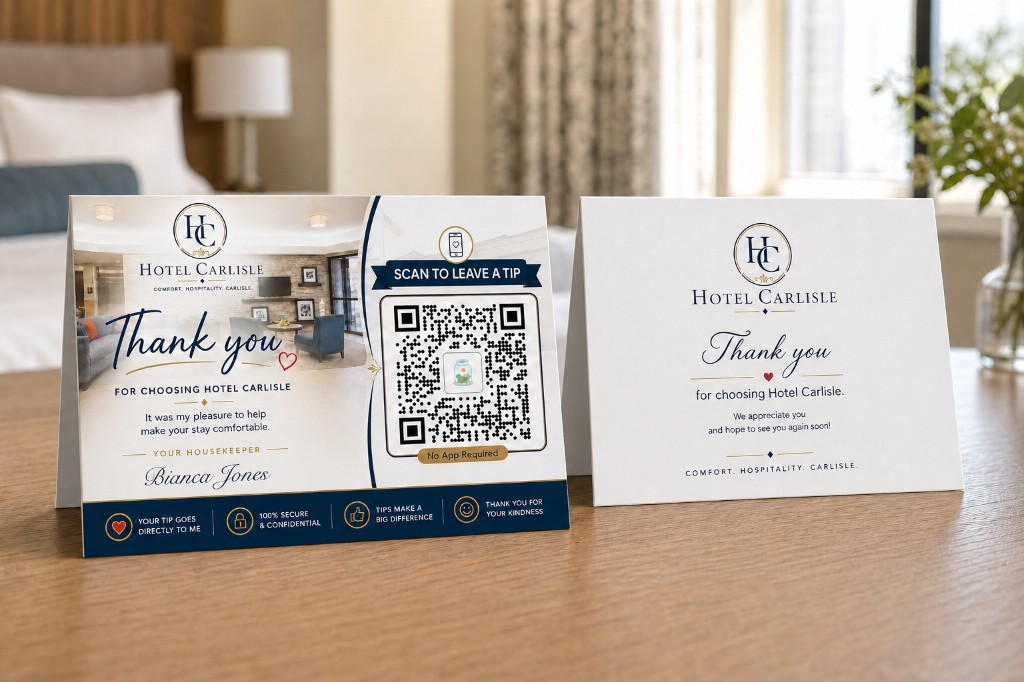
Employee-linked locations give hotels a simple way to offer digital tipping for individual housekeepers without requiring guests to search for an employee, hotels to configure every guest room, or managers to manually distribute tips.
With OpenTipJar, a hotel can create one Location for each housekeeper, connect that Location to the employee's independently owned OpenTipJar account, and enable Tip Visibility and Auto Share. The housekeeper then leaves a personalized hotel-branded QR card in each room they service.
When a guest scans the card and leaves a tip, OpenTipJar already knows which hotel Location generated the transaction and which employee is linked to it. The hotel retains reporting visibility for activity originating from its Location, while the employee can see their queued tips, receive a text message when a Location tip comes in, and automatically receive the net tip value after the transaction's three-day hold matures.
For hotels that want guests to tip individual housekeepers, this can be substantially simpler than managing a separate digital tipping Location for every guest room.
The same Location automation also supports pooled teams. A hotel can link a Share Group instead of one employee, then have each matured net tip split evenly among the group's eligible members. Each member receives a text when their share is sent.
The Core Idea: Let the Housekeeper Carry the Location
A common way to implement hotel digital tipping is to create a unique Location or QR code for every room. That works particularly well when the hotel wants room-level reporting or needs to distribute pooled tips according to room assignments—the approach covered in our hotel management group setup guide.
There is another approach when the goal is to let guests tip the individual who serviced their room:
Instead of making every room a Location, make every housekeeper a Location.
Imagine a housekeeping team with:
- Sara Long
- Ayla Jones
- Brian Ross
The hotel creates three OpenTipJar Locations:
- Sara Long -- Housekeeping
- Ayla Jones -- Housekeeping
- Brian Ross -- Housekeeping
Each Location has its own unique QR code. Each employee is invited to OpenTipJar as a Linked User, and the hotel connects that user to the corresponding Location.
The housekeeper's personalized card carries that Location's QR code from room to room.
This means the hotel does not have to tell OpenTipJar which employee cleaned Room 204 on Tuesday. The housekeeper who services Room 204 simply leaves their card in the room.
The physical card becomes the assignment mechanism.
What Is an Employee-Linked Location in OpenTipJar?
An employee-linked Location is an OpenTipJar Location that a hotel has connected to a specific Linked User.
The Location provides the hotel-side context and reporting. The Linked User relationship connects that Location to the employee's own OpenTipJar account.
For example:
| Setting | Example |
|---|---|
| Hotel Location | Sara Long -- Housekeeping |
| Linked User | Sara Long |
| Tip Visibility | Enabled |
| Auto Share | Enabled |
With this configuration, a guest who scans Sara's card does not need to select the hotel, choose Housekeeping, search an employee directory, or enter a room number.
The QR code already provides the context.
This is the hotel employee location model applied specifically to housekeeping: guests still scan, choose an amount, and pay, while the hotel keeps reporting on tips generated through its own Locations.
How Hotel Housekeeping Digital Tipping Works
The complete workflow has three participants: the hotel, the housekeeper, and the guest.
The hotel
The hotel creates the employee Location, invites the employee as a Linked User, connects the two records, enables the desired visibility and sharing settings, and provides the employee with personalized hotel-branded cards.
The housekeeper
The housekeeper carries their cards while servicing rooms. When they finish a room, they leave one of their cards behind. If another housekeeper's card is already present, they replace it with their own.
When practical, team members can return one another's cards so they can be reused.
The guest
The guest sees the name of the person who serviced the room directly on the card.
If they want to leave a tip, they scan the QR code, select an amount, and complete the payment using an available payment method such as Apple Pay.
There is no employee search and no room number to remember.
Step 1: Create One OpenTipJar Location for Each Housekeeper
Start by creating a separate OpenTipJar Location for every participating housekeeping employee.
Using descriptive names such as Sara Long -- Housekeeping makes reporting easy to understand later.
Each Location receives a unique OpenTipJar QR code. That code will ultimately appear on the employee's personalized room cards.
Unlike a room-based configuration, the number of Locations is based on the size of the participating housekeeping team rather than the number of hotel rooms.
A 200-room hotel with 20 participating housekeepers can therefore use 20 employee Locations instead of maintaining 200 room Locations when individual employee attribution is the goal.
Step 2: Invite Each Housekeeper as a Linked User
The hotel sends each employee an OpenTipJar Linked User invitation.
The employee creates or uses their own OpenTipJar account and independently accepts OpenTipJar's User Agreement, Privacy Policy, and applicable platform fees.
The employee's OpenTipJar account remains their account.
The Linked User relationship gives the hotel permission to work with that employee within the hotel's configured Locations. It does not give the hotel general visibility into unrelated tipping activity elsewhere in the employee's OpenTipJar account.
This distinction allows a hotel to report on activity generated through its own Locations while preserving the privacy of the employee's other OpenTipJar activity.
Step 3: Connect the Linked User to Their Housekeeping Location
After the employee accepts the invitation, connect the employee's Linked User record to the Location created for them.
For example:
Sara Long -- Housekeeping → Sara Long
The Location's QR code now represents both the hotel's reporting context and the employee relationship needed for tip visibility and sharing.
When a guest scans Sara's QR code, OpenTipJar knows that the transaction originated through Sara Long -- Housekeeping.
There is nothing else for the guest to identify.
Step 4: Enable Tip Visibility
OpenTipJar's Tip Visibility setting allows the Linked User to see inbound tips associated with their linked Location.
When Tip Visibility is enabled, the employee can see that a tip has been received and queued for their Location. They can also receive a text notification informing them about the inbound tip.
That gives the housekeeper immediate feedback that a guest has recognized their work, even though the transaction is still completing OpenTipJar's hold period.
The hotel also retains reporting visibility for transactions originating through its Location.
Step 5: Enable Auto Share
Without Auto Share, the hotel can periodically use Share Tips by Linked Locations to release eligible queued tips to the employees connected to those Locations.
For hotels that want to minimize administration, Auto Share removes that recurring step.
When Auto Share is enabled, OpenTipJar automatically shares the net tip value with the Linked User after the transaction's three-day hold is complete and the ledger record has matured.
The Linked User receives a text message when the Location tip comes in, provided Tip Visibility is enabled. The hotel does not need to log in every few days to distribute individual tips.
The system already knows:
- which Location received the tip;
- which Linked User is connected to that Location; and
- where the matured net value should be shared.
Link a Share Group for Pooled Hotel Teams
Not every hotel tipping Location belongs to one employee. Some departments work as a team and pool the tips generated in a shared service area.
For those workflows, a hotel can link one Share Group to a Location instead of linking one user. A Share Group is a saved crew of Linked Users who should receive that Location's tips together.
Consider a hotel breakfast area with 4-by-6-inch acrylic tap-to-tip signs placed around the dining space. Every sign uses the same Breakfast Location QR code or NFC destination, and that Location is linked to a Share Group containing the four or five employees who maintain the space.
When a guest tips through one of those signs, the transaction is recorded against the Breakfast Location for the hotel's centralized reporting. After the three-day hold completes and the tip matures, Auto Share evenly splits the net value among the Share Group's current eligible members.
Each group member receives a text message showing the amount shared to them when the automatic split happens. Unlike an individually linked Location with Tip Visibility, Share Group members are not texted when the original tip first comes in; they are texted when the matured tip is split and shared.
One Location tracks where the tip came from. One Share Group defines who shares it. Auto Share handles the distribution.
Step 6: Create Personalized Hotel-Branded Housekeeping Cards
Once the Locations are configured, each housekeeper receives cards containing their own name and Location QR code.
OpenTipJar can work with hotels to design professionally branded tent cards that fit naturally into the guest room—the same approach used for the Hotel Carlisle concept shown at the top of this article.
A typical card can include:
- the hotel's branding;
- the housekeeper's name;
- a simple thank-you message;
- a clear call to action such as Scan to Leave a Tip;
- the employee Location's unique QR code; and
- reassuring payment or privacy messaging.
One practical format is a heavy-cardstock folded tent card that is easy for the guest to notice but still feels consistent with the hotel's in-room materials.
The back of the card can also carry general hotel messaging, a guest thank-you, or other property-specific information.
Step 7: Make the Card Part of the Housekeeping Routine
The operational process is intentionally low-tech.
When a housekeeper finishes servicing a room, they leave their personalized card.
If the previous housekeeper's card is still there, they swap it for their own.
That simple action answers the question that many digital tipping systems otherwise have to solve with software:
Who should receive a tip from the guest currently staying in this room?
The answer is sitting in front of the guest.
No housekeeping schedule integration is required. No room-to-employee mapping has to be updated in OpenTipJar each day. And the guest does not have to remember the employee's name and search for them later.
A $20 Hotel Housekeeping Tip Example
Consider a guest checking out after a comfortable stay.
They see a card identifying the housekeeper who serviced their room and decide to leave a $20 tip.
The guest:
- scans the QR code on the housekeeper's card;
- taps the $20 tip option; and
- authorizes the payment, such as by double-clicking for Apple Pay.
The tipping interaction can be completed in seconds because the QR code already identifies the intended Location.
Using OpenTipJar's standard 5% + $0.40 transaction fee, the example looks like this:
| Transaction | Amount |
|---|---|
| Guest tip | $20.00 |
| OpenTipJar fee (5% + $0.40) | $1.40 |
| Net tip value | $18.60 |
The employee can be notified that a $20 tip has been received for their Location.
Once the three-day transaction hold completes and the ledger record matures, an Auto Share-enabled Location automatically shares the $18.60 net value with the connected employee's OpenTipJar account.
The employee can then request payout using the payout methods available through OpenTipJar.
Why This Is Easier for the Guest
Every additional decision in a digital payment flow creates another opportunity for the guest to stop.
An employee-linked QR card removes most of those decisions.
The guest does not have to:
- search for the hotel;
- select a property;
- choose the Housekeeping department;
- enter their room number;
- search a staff directory; or
- remember the name of the person who serviced their room.
The card itself answers those questions.
Scan. Choose a tip. Pay.
For a guest who is packing, checking out, calling a ride, or heading to the airport, reducing the process to a few seconds matters.
Why This Is Easier for the Hotel
Digital tipping can become surprisingly complicated if a hotel has to manage employee schedules, room assignments, pooled balances, and recurring distributions.
Employee-linked Locations are designed to reduce that administrative burden.
Once configured, the hotel's ongoing process can be as simple as maintaining the employee cards and updating Linked Users when staffing changes.
With Auto Share enabled, management does not need to manually distribute each matured tip—whether it goes to one Linked User or is evenly split across a Share Group.
At the same time, the hotel retains reporting visibility into tipping activity generated through its Locations.
After initial setup, day-to-day administration can be limited to reviewing reports when desired. Managers only need to update Linked Users, Share Group membership, or tipping materials when staffing or operations change.
That combination is important:
The employee gets a direct, simple tipping experience while the hotel retains property-level reporting context.
What Tip Information Can the Hotel See?
OpenTipJar's Linked User model is designed to provide reporting visibility for activity associated with the hotel's Locations without exposing unrelated activity in the employee's personal account.
If Sara is linked to Sara Long -- Housekeeping at the hotel, the hotel can report on tips originating from that Location.
That does not mean the hotel can see every tip Sara receives through OpenTipJar.
For example, if Sara independently receives tips elsewhere through her own OpenTipJar account, those unrelated transactions remain outside the hotel's Location reporting.
This gives the hotel useful operational reporting while maintaining a clear boundary around the employee's personal account activity.
Does the Hotel Have to Manually Pay Out Each Housekeeping Tip?
Not when Auto Share is enabled.
OpenTipJar tracks the transaction through its hold period and, once the ledger record matures, automatically shares the eligible net value with the Linked User connected to that Location.
This removes the need for hotel management to repeatedly log in and manually release each employee's tips.
Hotels that prefer more control can instead leave Auto Share disabled and use Share Tips by Linked Locations to release eligible tips on their own schedule.
How Does OpenTipJar Handle Tax Reporting?
OpenTipJar maintains transaction and recipient records needed to support applicable platform information-reporting requirements and can issue required tax forms, including Form 1099-K when applicable.
The employee creates and controls their own OpenTipJar account, while the hotel's Location provides the property-specific context used for attribution and reporting within OpenTipJar.
A hotel's own payroll, employee tip-reporting, withholding, and tax obligations depend on the hotel's circumstances and applicable law. Hotels should continue following their established payroll and tax procedures and consult their tax professional regarding their specific obligations.
Employee-Linked Locations vs. Room-Based Locations
Both approaches are useful, but they solve different operational problems.
| Hotel's Goal | Recommended Approach |
|---|---|
| Let guests tip the specific housekeeper who serviced the room | Employee-linked Locations |
| Automatically share matured tips with individual employees | Employee-linked Locations + Auto Share |
| Evenly split a service-area Location's matured tips across a crew | Share Group-linked Location + Auto Share |
| Track tipping activity by individual employee | Employee-linked Locations |
| Track exactly which room generated each tip | Room-based Locations |
| Pool tips and distribute them according to room assignments | Room-based Locations |
| Avoid maintaining daily room-to-employee assignments | Employee-linked Locations |
A hotel can also combine approaches when its operation requires more detailed attribution. The right configuration depends on what the property needs to know and how it wants tips distributed. See 5 Ways Hotel Tips Can Flow Through OpenTipJar for the broader set of models.
Frequently Asked Questions
What is digital tipping for hotel housekeeping?
Digital tipping allows a hotel guest to leave a cashless tip for housekeeping using a phone. With OpenTipJar, a guest can scan a QR code, choose a tip amount, and complete the payment without downloading an app.
Can a hotel create a QR code for each housekeeper?
Yes. A hotel can create an OpenTipJar Location for each participating housekeeper. Each Location has a unique QR code that can be placed on personalized hotel-branded cards carrying the employee's name.
How does a guest know which housekeeper to tip?
The housekeeper who services the room leaves their personalized card behind. The employee's name and unique QR code are already on the card, so the guest does not need to search for the employee.
Does the guest need to download an app?
No. Guests can access the OpenTipJar tipping experience directly from the QR code without downloading an OpenTipJar app.
Does the hotel have to assign housekeepers to rooms inside OpenTipJar?
Not with the employee-linked card model. The housekeeper leaves their own card in the room they serviced, so the physical card identifies the intended employee without requiring the hotel to maintain room assignments in OpenTipJar.
Can housekeepers see when they receive a tip?
Yes, when the hotel enables Tip Visibility for the employee-linked Location. The Linked User can see inbound tips associated with that Location and can receive tip notifications.
Can tips automatically go to the housekeeper?
OpenTipJar's Auto Share feature can automatically share the eligible net tip value with the Linked User after the three-day transaction hold is completed and the ledger record matures.
Can a hotel Location automatically split tips among a team?
Yes. Link a Share Group to the Location and enable Auto Share. After the tip's three-day hold is complete, OpenTipJar evenly splits the matured net value among the group's current eligible members. Each member receives a text message when their share is sent.
Can the hotel see all of an employee's OpenTipJar tips?
No. Linking an employee to a hotel Location does not provide the hotel with general access to unrelated transactions in that employee's personal OpenTipJar account. The hotel's reporting visibility is tied to activity associated with its Locations.
What does OpenTipJar charge for hotel housekeeping tips?
OpenTipJar's standard transaction fee is 5% + $0.40. There is no guest surcharge in the example above: a guest selecting a $20 tip pays $20, and the fee is deducted before the net value is shared.
Is employee-linked tipping only for housekeepers?
No. The same model can be useful anywhere a hotel wants a QR code to represent a particular employee or service role. The best configuration depends on the property's operational and reporting needs.
A Simpler Model for Individual and Pooled Hotel Tipping
Hotel digital tipping does not have to require a complicated software integration or a new daily administrative process.
With employee-linked Locations, the workflow follows what housekeeping staff already do.
The housekeeper services the room.
They leave their personalized card.
The guest scans it and leaves a tip.
The employee sees that the tip was received.
The hotel retains reporting visibility for its Location.
And Auto Share can move the matured net value to the employee's linked account without management manually distributing it.
For pooled service teams, a linked Share Group can instead split each matured net tip evenly and notify every member when their share is sent.
The key is simple: instead of asking software to continuously determine which employee belongs to which room, let the housekeeper carry the Location with them.
For hotels that want guests to recognize the individual who helped make their stay comfortable, that can make digital tipping considerably easier for everyone involved.
Ready to set up employee-linked housekeeping tips?
Create an OpenTipJar account, add a Location for each housekeeper, and we can help design hotel-branded tent cards that guests actually notice.
Questions about hotel setup or tent cards? support@opentipjar.com
Related Articles
- Make Housekeeping Appreciation Easier to Act On
- How to Tip Hotel Housekeeping Without Cash
- 5 Ways Hotel Tips Can Flow Through OpenTipJar
- How a Hotel Management Group Sets Up OpenTipJar Across Multiple Properties
- How to Track Tips and Donations by Location with OpenTipJar
- Sharing Tips Using OpenTipJar
- Cashless Tipping for Hotels, Vacation Rentals, and Inns
- Digital Tipping for Hotels