OpenTipJar Blog • Guide
How to Connect a Digital Tip Jar to Your Bank Account
By OpenTipJar •

One of the most common questions people have about digital tipping is simple: How do I actually get the money from my digital tip jar into my bank account?
For sole owners, independent service providers, musicians, creators, fundraisers, and small business owners, the payout process should be easy to understand. With OpenTipJar, tips received through your profile page are added to your available account balance. When you are ready, you can request a personal payout and receive the funds through a secure payout process.
This guide explains how digital tip jar payouts work, how OpenTipJar handles personal payout requests, and what members can expect after requesting their funds. If you are new to digital tipping, start with our guide on what a digital tip jar is.
How Digital Tip Jar Payouts Work
A digital tip jar lets people leave tips online using a profile page, QR code, NFC sign, or direct link. When someone tips you through OpenTipJar, the funds are first processed and then added to your available OpenTipJar balance.
The basic flow looks like this:
Guest leaves a tip
        ↓
Funds are added to your OpenTipJar balance
        ↓
You request a personal payout
        ↓
OpenTipJar reviews the request
        ↓
You receive a secure Found.com payout text message
        ↓
You accept the payout and transfer funds
This process helps keep payouts simple while still allowing OpenTipJar to review requests for fraud, suspicious activity, or payment concerns before funds are released.
Step 1: Receive Tips Through Your OpenTipJar Profile
Each OpenTipJar member has a profile page where people can leave tips, donations, or payments. Members can share this page using:
- A QR code
- An NFC tap-to-tip sign
- A direct profile link
- A social media link
- Printed signs, posters, cards, or table displays
When someone leaves a tip, the amount is added to the member's available balance once the payment is processed.
For a sole owner, this balance belongs to the account owner and can be requested as a personal payout. See our guide on how to create a tip-enabled payment page for setup details.
Step 2: Request a Personal Payout
When you are ready to cash out your available balance, log into your OpenTipJar dashboard and choose the payout option. Your available balance and a Request Payout button appear in Account Info:
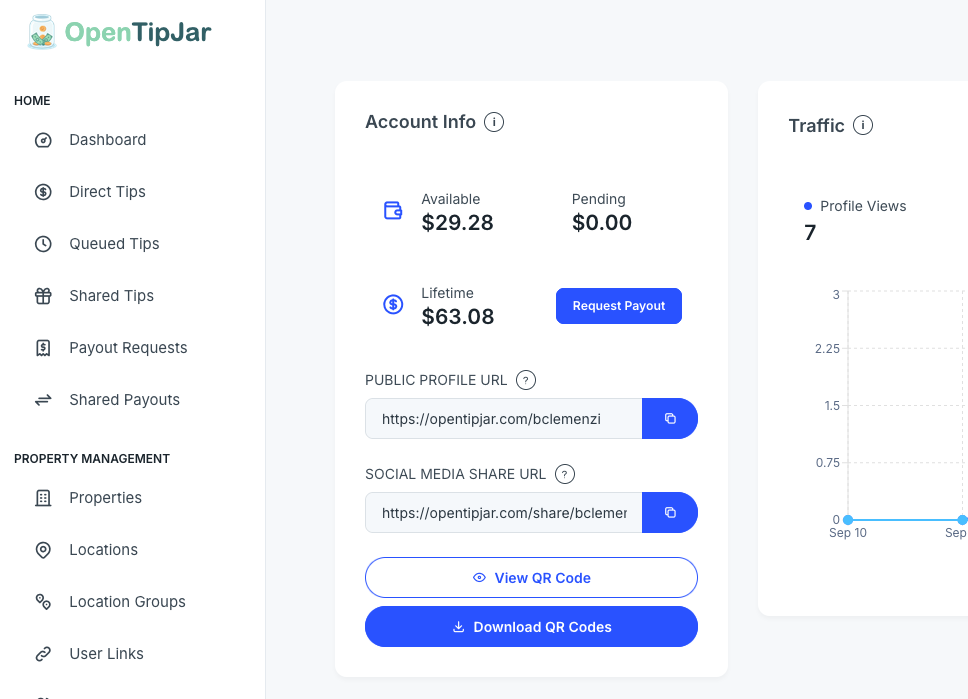
OpenTipJar supports different payout actions, including shared tip workflows. For a sole owner who is cashing out their own available balance, choose:
Request Personal Payout
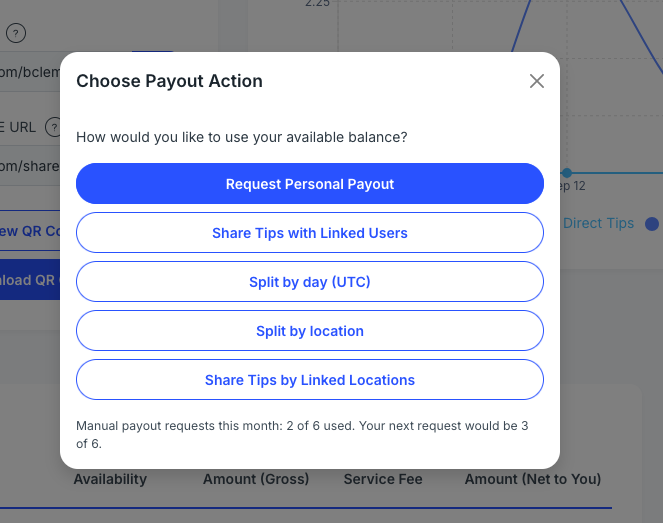
This tells OpenTipJar that you want to request a payout of your available balance for yourself.
Members can request up to 6 manual payouts per month.
Step 3: Confirm Your Payout Request
After selecting Request Personal Payout, OpenTipJar will ask you to confirm the request:
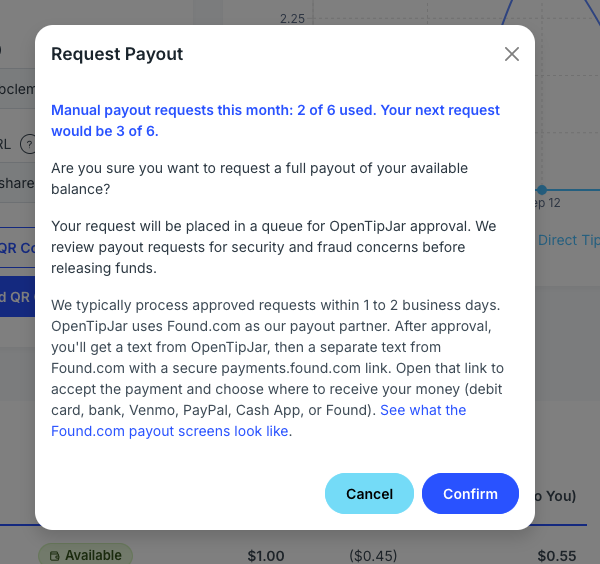
The confirmation screen helps make sure you understand that:
- You are requesting a payout of your available balance
- The request will be placed into the OpenTipJar review queue
- OpenTipJar support reviews payout requests for security and fraud concerns
- Approved requests are typically processed within 1 to 2 business days
Once confirmed, your payout request is submitted for review.
Step 4: OpenTipJar Reviews the Request
Before releasing funds, OpenTipJar support reviews payout requests to help protect members, customers, and the platform.
This review helps check for issues such as:
- Suspicious payment activity
- Potential fraud
- Dispute or chargeback risk
- Unusual account behavior
- Payments that may require additional review
Most personal payout requests are reviewed within one business day.
For normal account activity, this is usually a straightforward process.
Step 5: Receive Your Found.com Payout Text Message
Once your payout request is approved, OpenTipJar sends the payout through Found.com, our payout partner. You will first get a text from OpenTipJar confirming the payout was sent, then a separate text from Found.com with a secure link.
The Found.com message looks similar to this and includes a payments.found.com link:
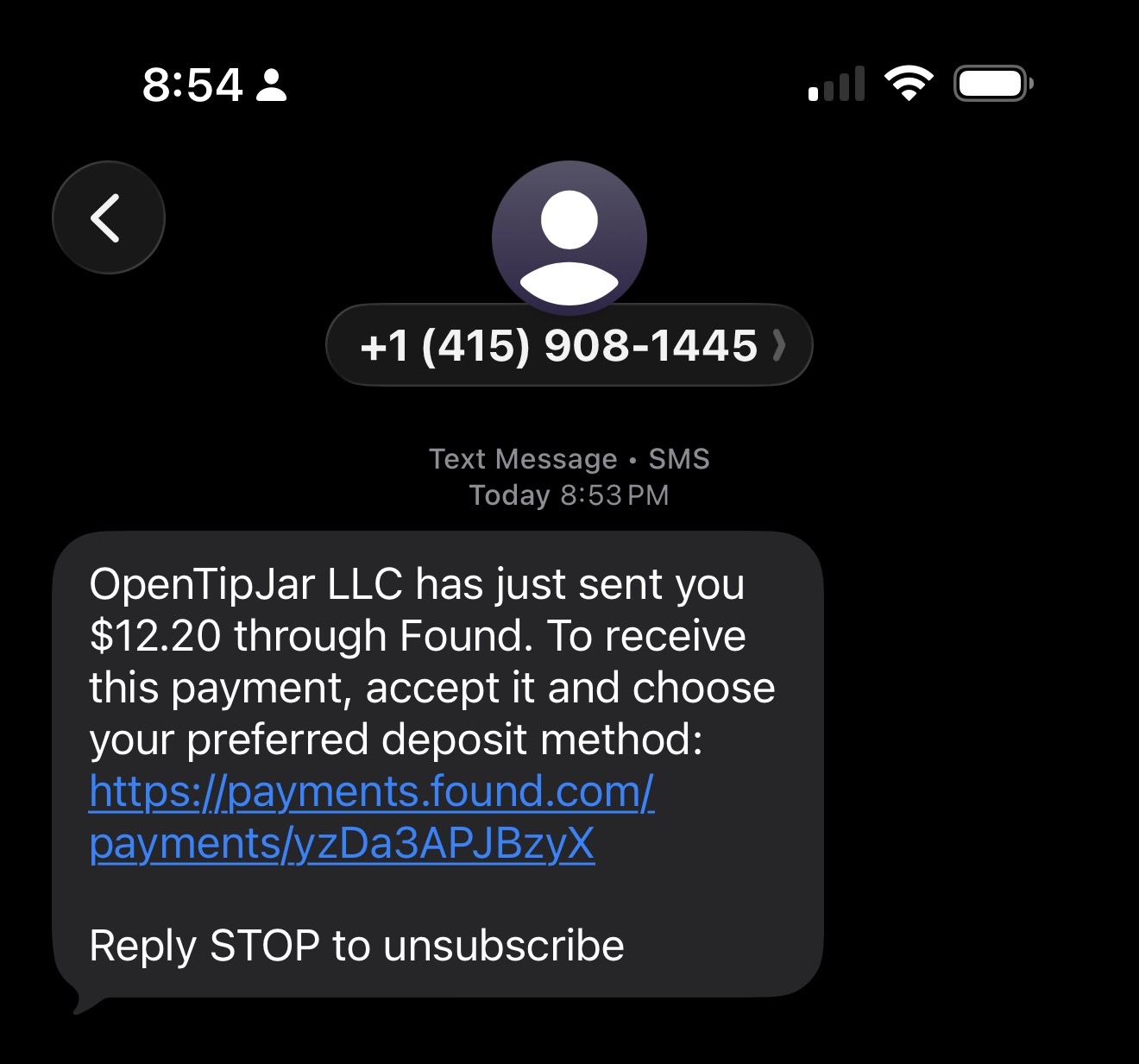
Tap that link. Found.com will ask you to verify your phone number with a one-time code:
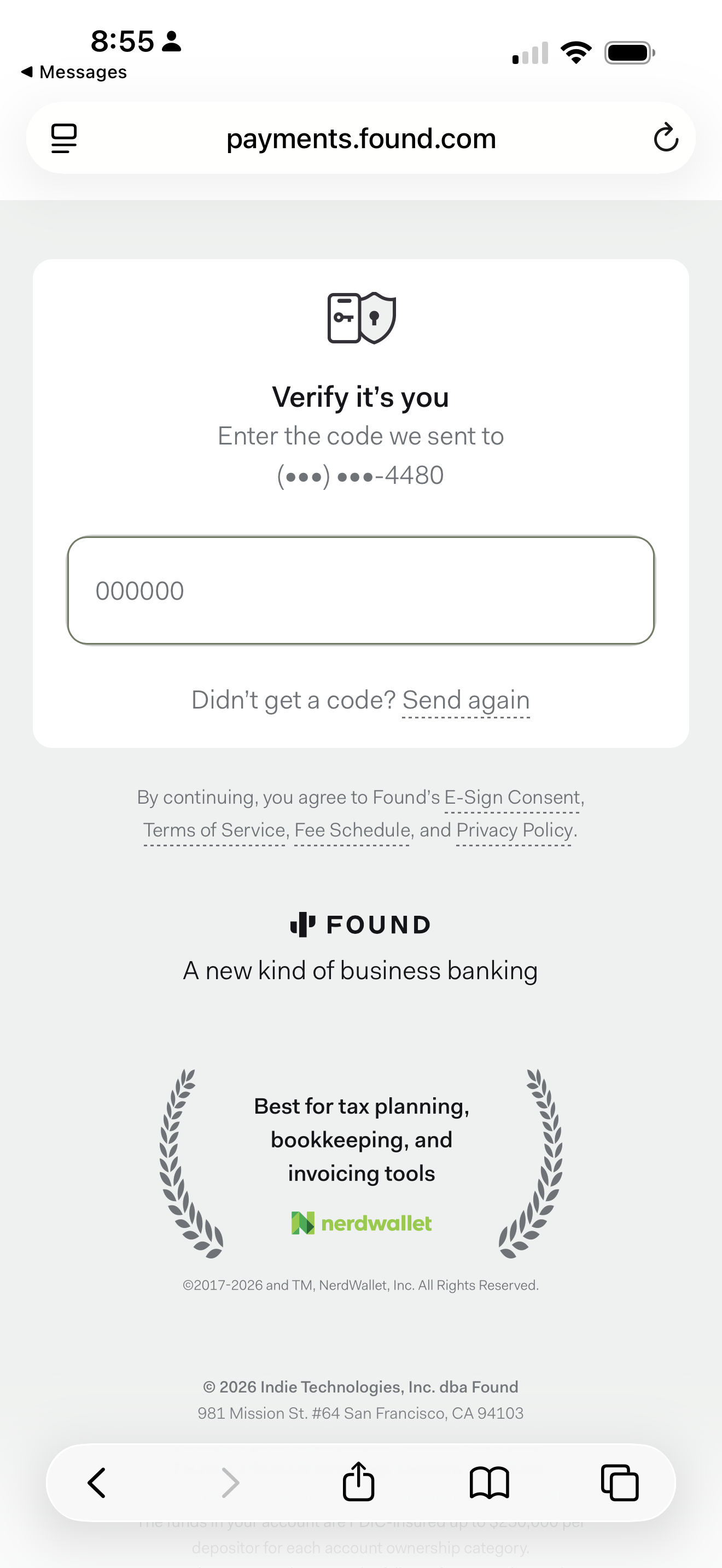
After verification, choose where to receive your money — Found account, debit card, bank account, or other payment apps like Venmo, PayPal, or Cash App:
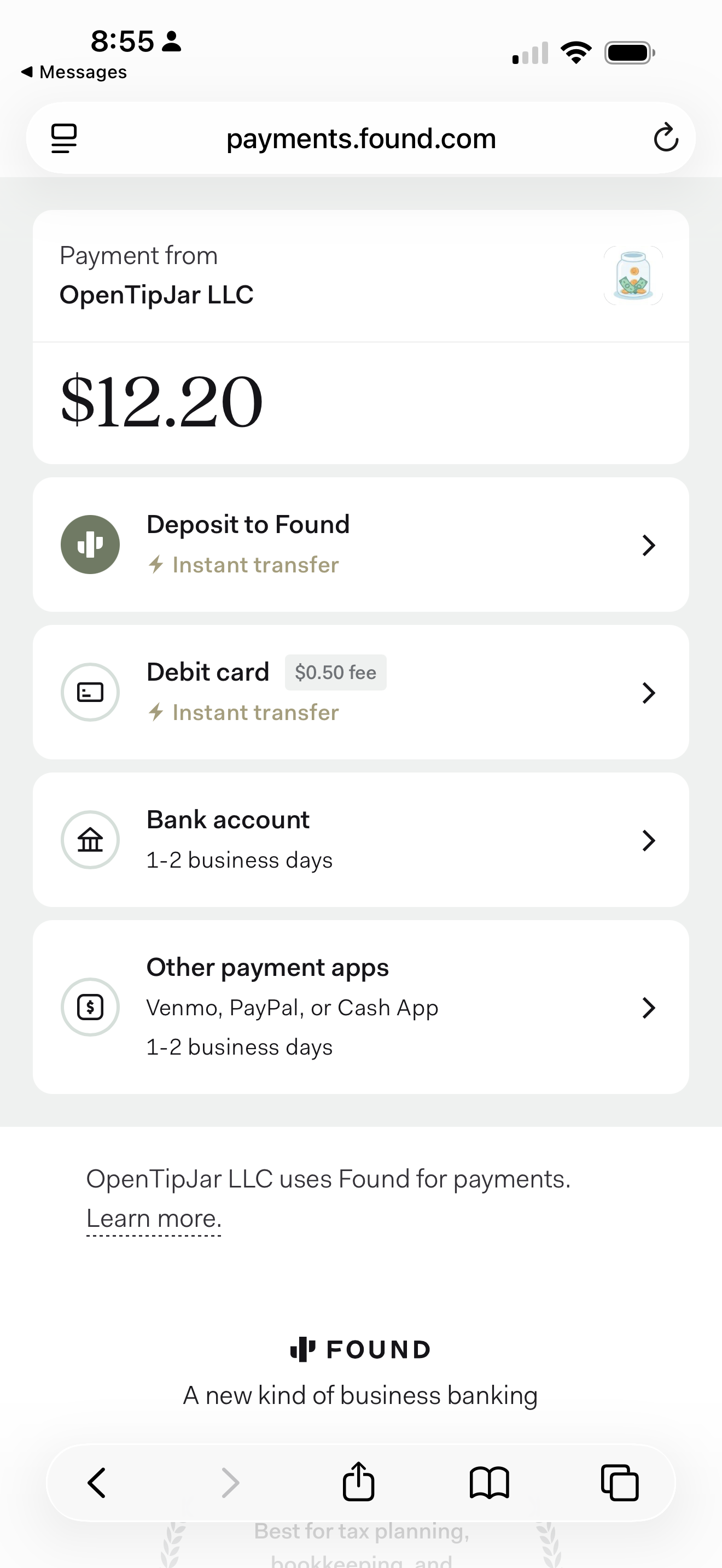
Helpful reference: Found.com: How do I pay a contractor?
Using Found.com allows OpenTipJar to provide a secure payout workflow without requiring members to enter sensitive banking details directly into OpenTipJar.
Step 6: View Your Payout Request History
After submitting a payout request, members can view payout activity inside the OpenTipJar web application.
The Payout Requests page shows details such as:
- Request ID
- Plan
- Status
- Requested amount
- Created date
- Updated date
This gives members a simple way to track payout requests and review past payout activity.
Why OpenTipJar Reviews Payouts Before Releasing Funds
Some people expect online tips to transfer instantly. While instant payouts can sound convenient, a short review step helps protect everyone involved.
OpenTipJar reviews payout requests because digital payments can involve fraud, failed payments, disputes, or unauthorized transactions. Reviewing requests before funds are released helps reduce these risks.
This is especially important for platforms that support public profile pages, QR codes, and online tipping links because anyone can access a tipping page and submit a payment.
The review process is designed to be simple for legitimate members while adding protection against abuse.
Do You Need to Connect Your Bank Account Directly to OpenTipJar?
No. OpenTipJar does not require members to directly connect a bank account inside the OpenTipJar dashboard for personal payouts.
Instead, approved payouts are sent through Found.com. Members receive a secure text message from Found.com and complete the payout acceptance process from there.
This keeps the OpenTipJar payout process simple and helps reduce the amount of sensitive financial information stored directly in the OpenTipJar application.
Personal Payouts vs Shared Tips
This article focuses on personal payouts for sole owners who are cashing out their own available balance.
OpenTipJar also supports shared tip workflows for teams, pooled tipping, and linked users. That type of payout is different because funds may need to be divided among multiple people. Learn more in our guide to sharing tips with OpenTipJar.
A personal payout is best when:
- You are the sole owner of the account
- The available balance belongs to you
- You are not splitting the payout with linked users
- You want to cash out your own tips, donations, or payments
For team-based accounts, shared tip options may be more appropriate.
Frequently Asked Questions
How many payouts can I request per month?
OpenTipJar members can request up to 6 manual payouts per month.
How long does a personal payout take?
OpenTipJar support typically reviews payout requests within one business day. Approved requests are usually processed within 1 to 2 business days.
How do I receive my payout?
After approval, you will receive a text from OpenTipJar, then a secure text message from Found.com with a payments.found.com link to accept your payout and choose where to deposit the money.
Can I see my payout history?
Yes. Members can view payout request history in the OpenTipJar web application under Payout Requests.
Is this the same as sharing tips with linked users?
No. A personal payout is for a sole owner cashing out their own available balance. Shared tips are used when funds need to be distributed to linked users or team members.
Start Accepting Tips Online
OpenTipJar makes it simple to accept tips online through a QR code, NFC sign, or profile link. When tips are received, they are added to your available balance. When you are ready, you can request a personal payout and receive your funds through a secure payout process.
If you are looking for a simple way to accept digital tips and cash out your balance, OpenTipJar gives you an easy path from profile page to payout. Learn more about cashless tipping and why tip jars are going digital.
Create your OpenTipJar account
Set up your free profile, start accepting tips online, and request personal payouts when you are ready to cash out.