OpenTipJar Blog • Guide
How to Create a Tip-Enabled Payment Page (Step-by-Step Guide, 2026)
By OpenTipJar •
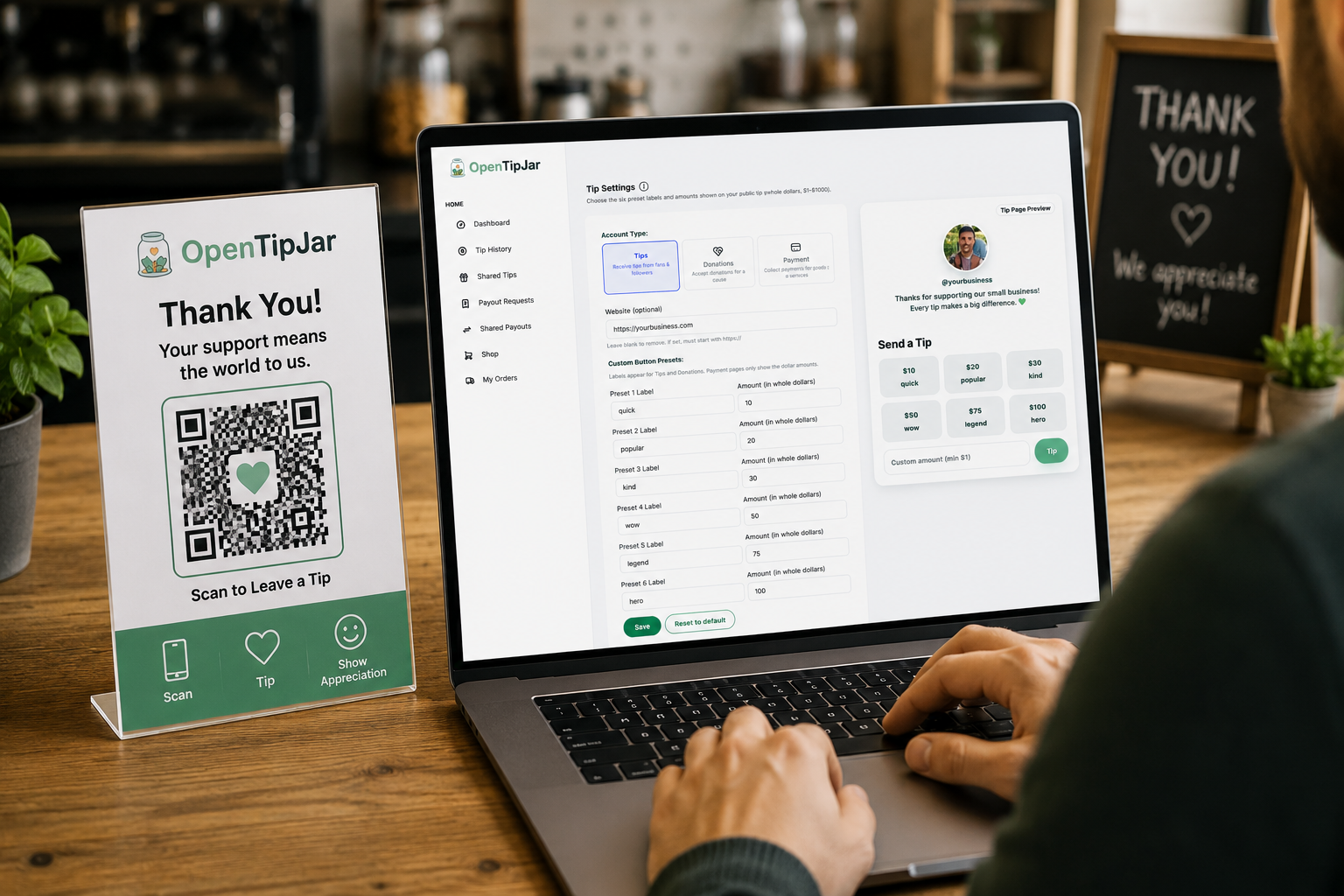
If you run a hotel, café, salon, food truck, or any service-based business, you've probably noticed customers asking — or wishing they could ask — to tip without cash. The fix is a tip-enabled payment page: a simple web page customers reach by scanning a QR code or tapping an NFC sign, where they can leave a gratuity in seconds.
This guide walks through exactly how to set one up, what you need before you start, and what to avoid.
What Is a Tip-Enabled Payment Page?
A tip-enabled payment page is a hosted, secure web page built specifically for collecting voluntary tips or gratuities. Customers reach it by scanning a QR code, tapping an NFC-enabled sign, or clicking a shared link — no app download required.
It's different from a general payment link (like a basic PayPal or Venmo request) because it's designed around the tipping use case specifically: preset tip amounts, custom tip entry, optional team/pooled tipping, and signage-ready QR codes.
What You'll Need Before You Start
Before creating your page, gather the following:
- A business or individual account with a tipping platform (see "Choosing a Platform" below)
- A way to accept digital payments — most platforms handle this for you via Stripe, Apple Pay, or Google Pay integration, so you typically don't need your own merchant account
- A logo or photo, if you want a branded page
- A decision on tip distribution — will tips go to one person, or be pooled across a team?
- A place to display your QR code or NFC sign — at the register, in guest rooms, on a table tent, on a business card, etc.
Step-by-Step: Creating Your Tip-Enabled Payment Page
Step 1: Choose a Platform
Look for a platform built specifically for tipping rather than a generic payment link tool. Generic links (e.g., a plain PayPal.me page) work, but they lack tip-specific features like preset amounts, QR/NFC support, and team pooling. Compare a few options based on:
- Whether it's free to set up
- What fee structure applies (flat fee vs. percentage, and who pays it — you or the customer)
- Whether NFC tap-to-tip is supported, not just QR codes
- Whether it supports pooled tips for teams
- How fast you can go live (minutes vs. days)
Step 2: Create Your Profile
Sign up and build your profile page. This usually takes a few minutes and includes:
- Your business or individual name
- A short description (optional)
- A profile photo or logo
- Preset tip amounts (e.g., $5 / $10 / $20) plus a custom amount field
Step 3: Set Up Your Payout Method
Connect a bank account or debit card so funds can be deposited. Most platforms use a secure third-party payment processor for this step, so you're not handling card data directly.
Step 4: Decide Individual vs. Pooled Tipping
If multiple people should benefit from the same page — for example, a hotel's housekeeping and front-desk staff — set up pooled tipping so the platform automatically splits or distributes gratuities according to your rules.
Step 5: Generate Your QR Code and/or NFC Tag
Once your profile is live, the platform will generate a unique QR code and a shareable link. Some platforms also support NFC tags or stickers that customers can tap with their phone instead of scanning.
Step 6: Print and Display Your Signage
Print your QR code on:
- Table tents or counter signs
- Guest room cards (for hotels)
- Business cards
- Receipts
- Tip jars or donation boxes
Step 7: Share Your Link Online
Beyond physical signage, share your tipping link on your website, social media bios, email signatures, or in text messages — anywhere a customer might want to tip remotely.
Step 8: Test It Yourself
Before rolling it out, scan your own QR code and walk through the payment flow as a customer would. Confirm the amount options look right, the branding displays correctly, and a test payment lands in your account as expected.
Choosing a Platform: What Actually Matters
Not all tip-enabled payment tools are built the same way. When comparing options, the practical differences usually come down to:
Cost structure: Some platforms charge the business a monthly or per-transaction fee; others — like OpenTipJar — are free to the business and only apply a small fee on the tip itself, paid by the tipper. This matters a lot for low-margin, high-volume environments like hotels or cafés.
Setup complexity: Enterprise-grade tools built for large hotel chains can take days or weeks to deploy and may require IT involvement. Lighter platforms are often live within minutes.
NFC support: QR codes work everywhere, but NFC tap-to-tip can reduce friction further, especially for guests already used to tap-to-pay.
App requirements: Some platforms require the tipper to download an app, which adds friction and reduces completion rates. Look for "browser-only" tipping if you want to maximize how many people actually finish the payment.
Common Mistakes to Avoid
- Making the customer create an account or download an app before they can tip — this kills conversion
- Hiding the QR code in a spot guests don't naturally look
- Not testing the payment flow on both iPhone and Android before going live
- Choosing a platform with unclear fees, especially ones that take a cut from the business rather than the tipper
- Forgetting to set up pooled tipping when multiple staff should benefit
Frequently Asked Questions
Do I need a POS system to accept tips this way?
No. Tip-enabled payment pages run independently of your point-of-sale system. You can use one even if you don't have a POS at all.
Is it free to set up a tip-enabled payment page?
Many platforms, including OpenTipJar, are free for the business to use, with a small fee applied to the tip itself rather than charged to the property or professional.
Can I use this for a team instead of one person?
Yes — most platforms built for hospitality support pooled tipping so gratuities can be split across housekeeping, front-desk, and other staff.
How long does setup take?
With a lightweight platform, you can typically create a profile, generate a QR code, and have signage ready to print within 10–15 minutes.
Can customers tip without downloading an app?
With browser-based platforms like OpenTipJar, yes — customers complete the tip directly from their phone's browser after scanning or tapping, with no app or account required.
Final Thoughts
Setting up a tip-enabled payment page is a quick, low-cost way to let customers express appreciation without cash — and for businesses, it's largely "set it up once and let it run." The real decision points are which platform fits your fee preferences, whether you need pooled tipping, and how fast you want to go live.
If you're setting this up for a hotel, café, or service business and want a platform that's free to the business, requires no app for the customer, and supports both QR and NFC, OpenTipJar can typically get you live in under 15 minutes.
Create your tip-enabled payment page today
Set up your free OpenTipJar profile, generate QR codes, and start accepting cashless tips in under 15 minutes — no POS or customer app required.