OpenTipJar Blog • Product update
Hotel Tip Analytics: Know What's Working at Every Property
By OpenTipJar •
Digital tipping gives guests an easy way to say thank you. Analytics shows you where it's working—and where a card needs to be moved, a team member needs to be linked, or a property needs a little attention.
Every OpenTipJar Hotel/Inn account now includes a full Analytics dashboard. It turns QR code scans and guest tips into clear reporting by property, location, and team member—written in plain language, so a general manager can act on it in a minute. It's included at no extra cost.
Key Takeaways
- Plain-language insights flag what needs attention and what's working.
- A property scorecard compares every hotel in your group side by side.
- Location-level detail shows each team member's tips, averages, and trend.
- A heatmap shows when guests tip, in your property's time zone.
- Guest reach counts different guests without collecting names or card numbers.
- Works with the QR code cards you already have—no hardware, no add-on fees.
Insights Written in Plain Language
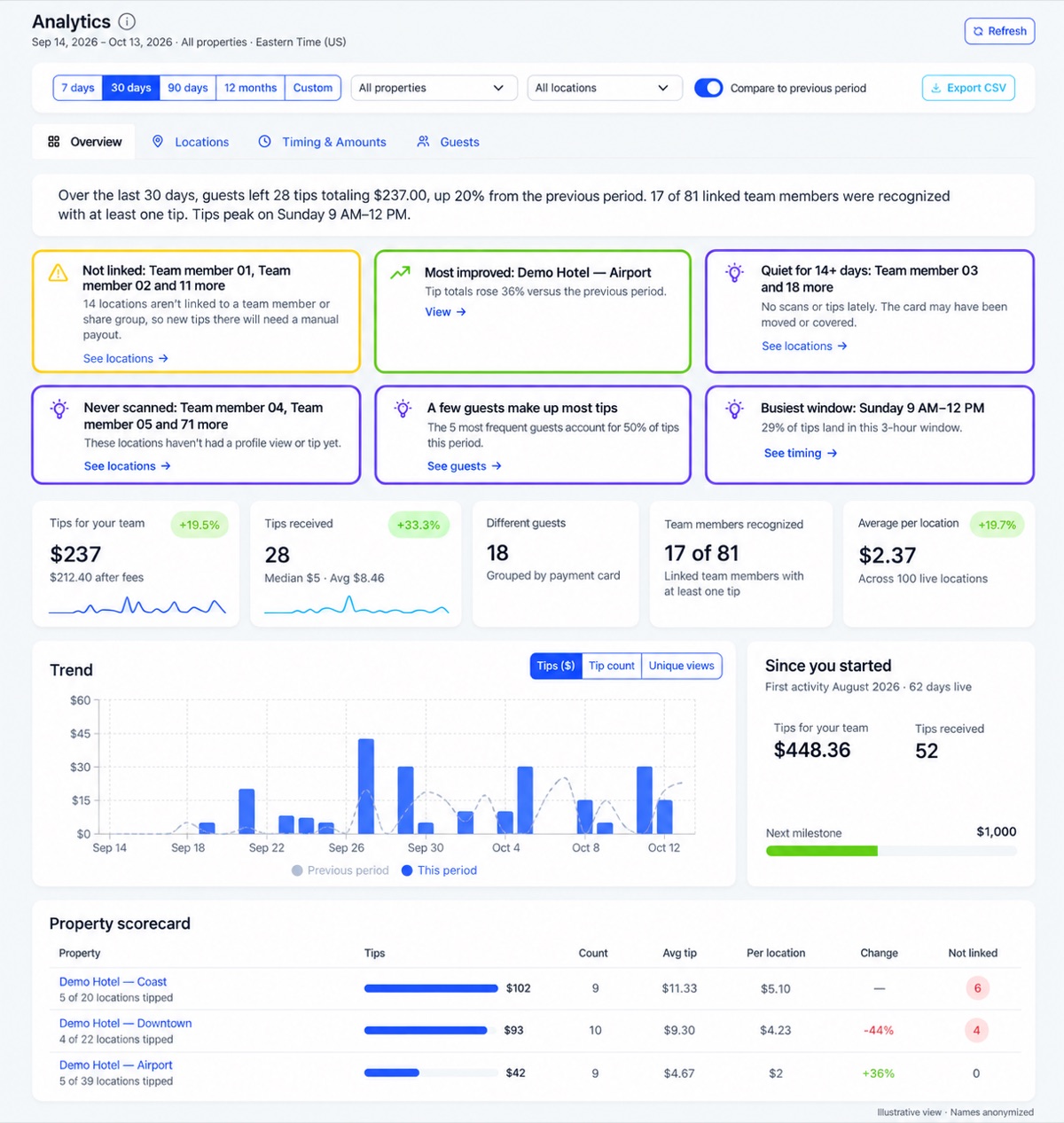
The dashboard opens with a one-sentence summary of the period you choose, such as: "Over the last 30 days, guests left 28 tips totaling $237.00, up 20% from the previous period. 17 of 81 linked team members were recognized with at least one tip."
Below the summary, insight cards call out what to do next:
- Most improved property — the hotel with the biggest gain over the previous period.
- Tips up or down — with one click to see exactly which locations drove the change.
- Not linked — staff cards that aren't connected to a team member yet, so tips there would need a manual payout.
- Quiet for 14+ days or never scanned — cards that may have been moved, covered, or never placed.
- Busiest window — the three-hour block when most tips arrive.
Every card links straight to the filtered view that explains it, so you spend less time digging and more time fixing.
A Scorecard for Every Property
Management groups get a side-by-side scorecard for each hotel: total tips, tip count, average tip, average per location, change versus the previous period, and how many staff cards still need to be linked. Click any property to filter the entire dashboard to that hotel.
Key metrics compare automatically to the previous period, and a trend chart overlays this period against the last one so you can spot momentum at a glance.
Location-Level Detail, Down to Each Housekeeper
Every staff member, room, or department card gets its own row with total tips, average and median tip, change versus the previous period, last activity, and a daily trend line. Status labels—Active, Quiet, and Never scanned—and setup labels like Not linked and Auto share off make follow-up obvious.
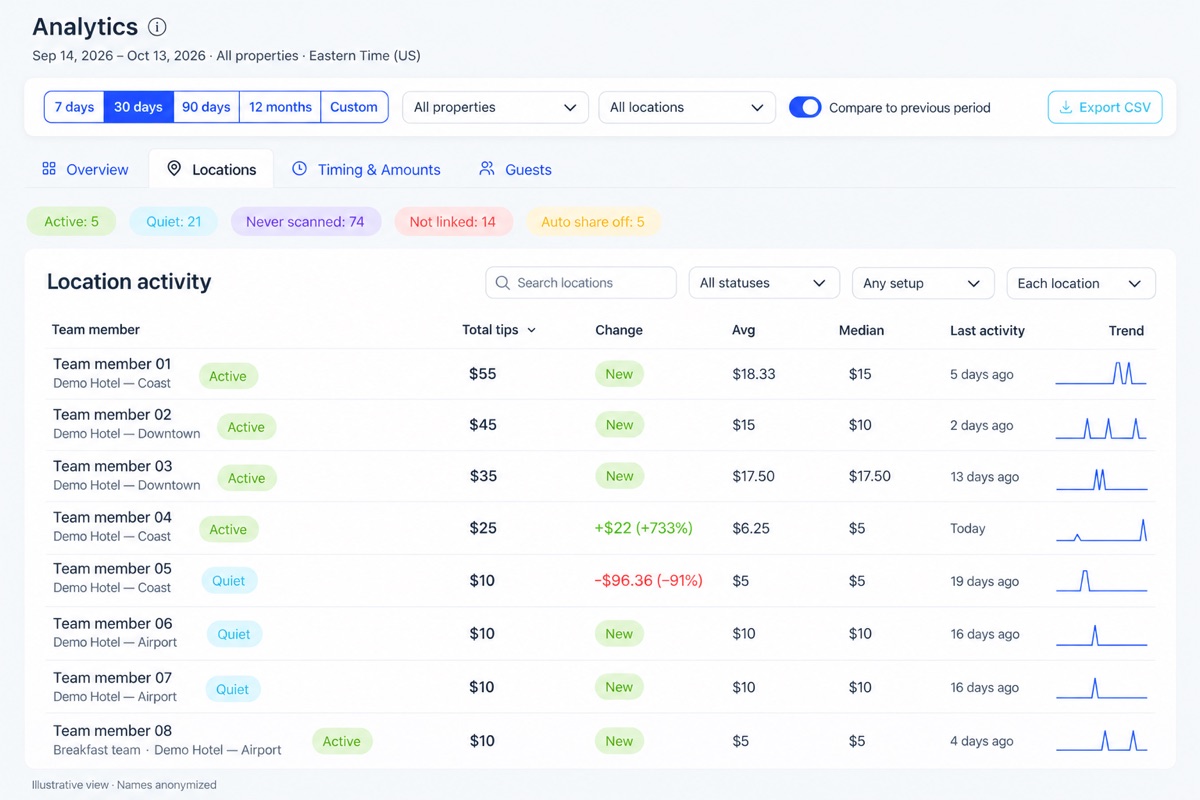
Sort by any column, search by name, group rows by property or location group, and export to CSV for payroll reviews or leadership reports.
When Guests Tip, and How Much
A day-by-hour heatmap shows when guests tip, displayed in your property's own time zone. Use it to time card placement, checkout reminders, and staffing. Bar charts break the same activity down by day of week and hour of day.
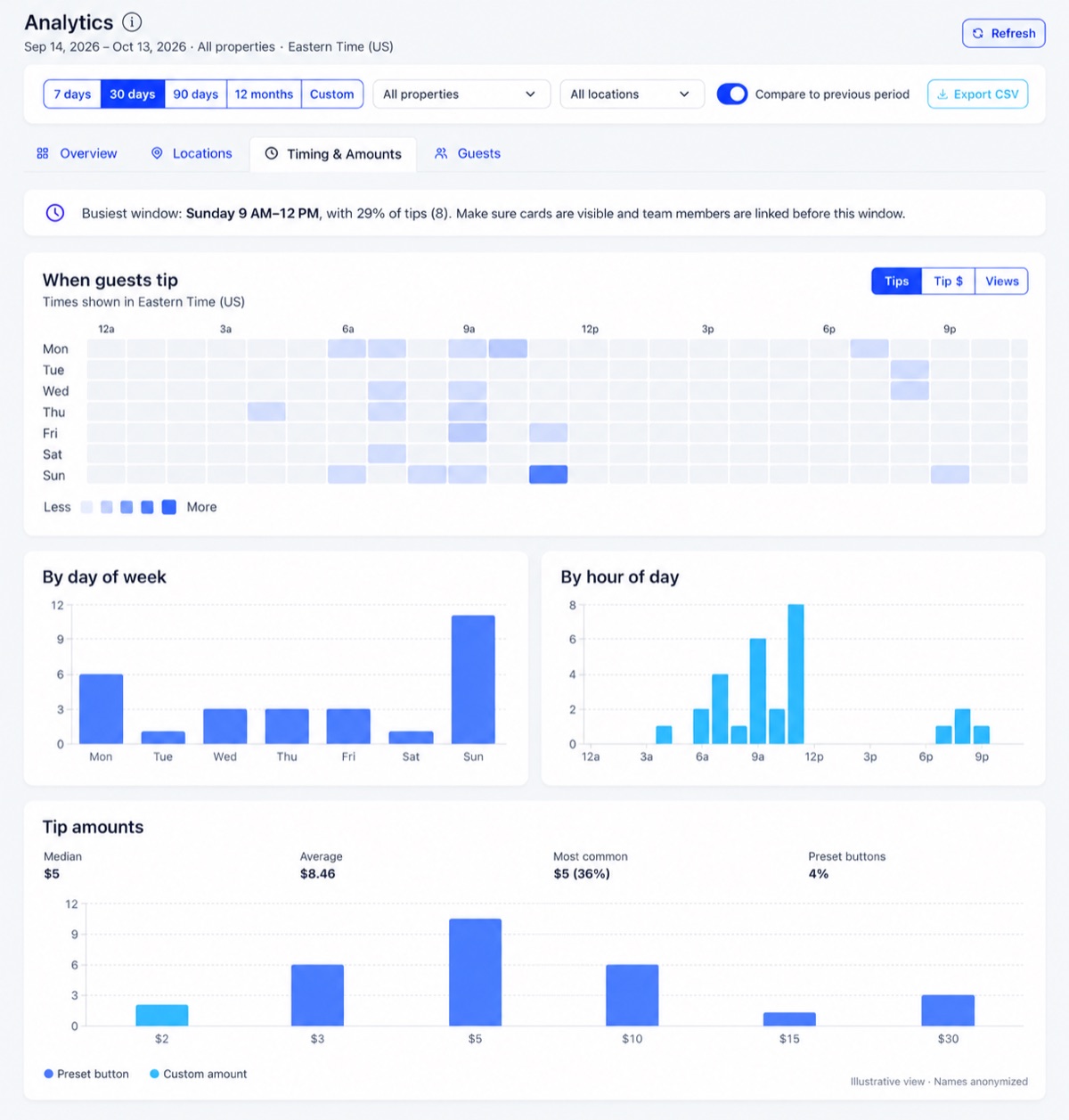
The tip amount chart shows the median, average, and most common tip, plus how often guests choose your preset buttons versus entering a custom amount—so you can tell whether your presets fit your guests.
The Guest Journey, From Scan to Review
See how guests move from viewing a team member's page, to starting checkout, to leaving a tip, to clicking through to review your property. Review referrals show how often the post-tip review prompt turns into a visit to your review page.
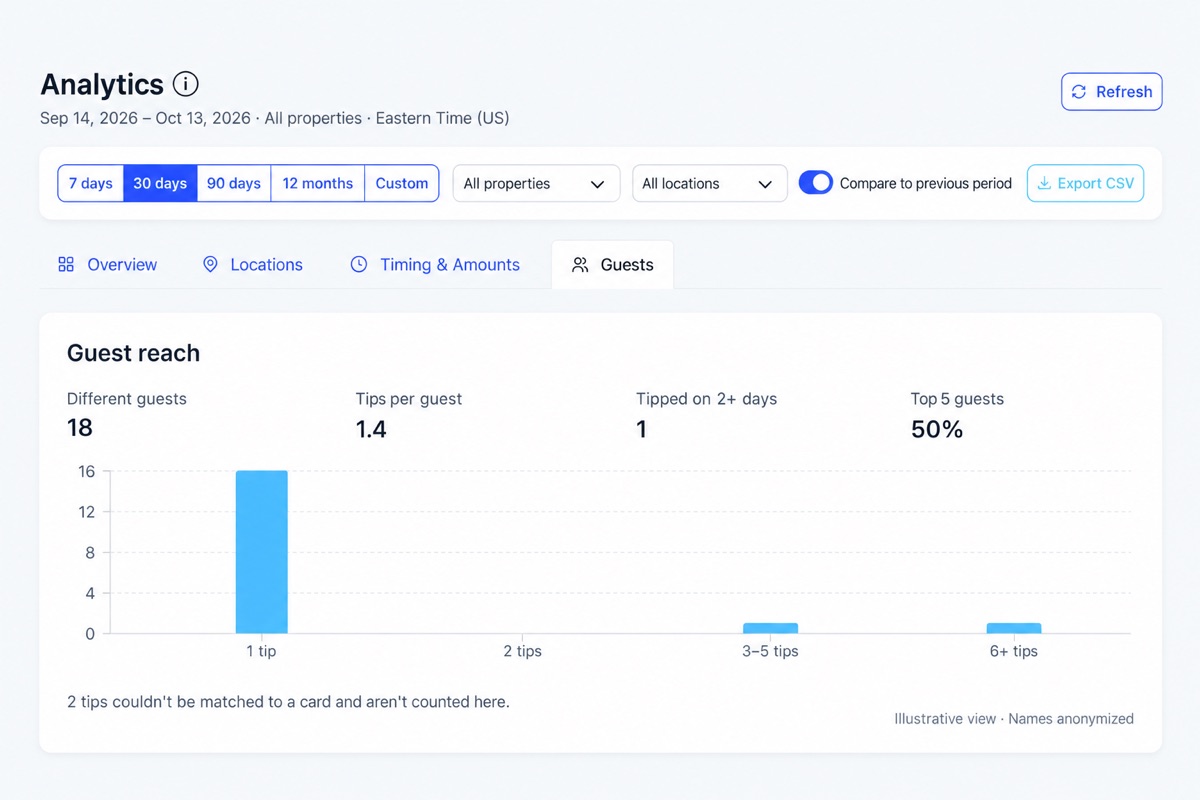
Guest reach shows how many different guests tipped, how many tipped on more than one day, and whether tips come from a few regulars or a broad mix of guests. Guests are grouped by payment card using a private, per-hotel identifier—never a name or card number.
Lifetime Milestones That Celebrate Your Team
A running lifetime total and milestone tracker—$1,000, $5,000, $10,000 and beyond—make it easy to share wins at a morning huddle. Recognition is the point of a tipping program, and milestones give your team something to celebrate together.
Early Results From the Field
Within the first weeks of launch, one multi-property hotel group saw individual housekeepers average $15–$25 per tip, with top earners approaching $100 in guest tips. The scorecard made it easy to see which properties were off to a fast start and which needed cards placed or team members linked.
Built for How Hotels Actually Operate
- Works with the cards you already have. QR codes on room cards, business cards, and acrylic signs. No special hardware to buy or keep charged.
- Included at no extra cost. No monthly subscription, no per-room fees, and no add-on charge for analytics.
- Your team keeps custody of their tips. Tips go directly to each employee's account. Management gets the reporting, not the money.
- Built for groups. Filter by property, location group, or a single team member. Compare periods. Export anytime.
- Your time zone. Days and hours line up with your property's local time, not a server clock.
Frequently Asked Questions
What is hotel tip analytics?
Hotel tip analytics is reporting that shows how guest tips flow through a property: totals and trends, which team members and locations are earning tips, when guests tip, typical tip amounts, and how guests move from scanning a QR code to leaving a tip.
Does the Analytics dashboard cost extra?
No. Analytics is included with every OpenTipJar Hotel/Inn account. There is no monthly subscription, no per-room fee, and no add-on charge for reporting.
Can I compare multiple hotels in one dashboard?
Yes. Multi-property accounts get a property scorecard that compares tips, tip count, average tip, average per location, change versus the previous period, and setup gaps for every hotel. You can filter the whole dashboard to a single property, location group, or team member.
Does analytics require special hardware?
No. Analytics works with the QR code cards and signs you already use—room cards, business cards, acrylic signs, and team signage. Guests scan with their phone camera; there is nothing extra to buy or install.
How are guests counted without collecting personal information?
Guest reach groups tips by payment card using a private, per-hotel identifier. OpenTipJar never shows guest names or card numbers, and the identifier cannot be used to connect a guest across different hotels.
Can I export the data?
Yes. Location activity can be exported to CSV for payroll reviews, leadership reports, or your own spreadsheets.
What time zone does the dashboard use?
Activity is shown in your account's time zone, which you can change on the My Account page. Daily totals and the tipping heatmap line up with your property's local day.
See what's working at every property
Already a hotel customer? Open Analytics from your dashboard menu. New to OpenTipJar? See how digital tipping and analytics work for hotels.